

 zefick12
Gaming graphics have come a long way, but nothing has sparked as much debate among players as ray tracing technology. If you’ve been scrolling through gaming forums or watching hardware reviews, you’ve probably heard this term thrown around countless times. Some gamers swear it’s the future of visual fidelity, while others dismiss it as an expensive gimmick that tanks your frame rates. So what’s the real story behind ray tracing, and should you actually care about it when choosing your next GPU?
Understanding Ray Tracing: The Physics Behind Beautiful Graphics
Ray tracing represents a fundamental shift in how computers generate images for video games. Traditional rendering methods use shortcuts and approximations to create lighting effects quickly. They’re efficient, but they’re essentially clever tricks that fake the way light behaves in the real world.
Ray tracing works differently. Instead of using these approximations, the technology simulates how individual light rays actually travel through a virtual environment. Your graphics card tracks how these virtual photons bounce off surfaces, how they reflect, refract, and scatter when hitting different materials. The result? Lighting that behaves almost exactly like it does in reality.
Think back to high school physics class when your teacher drew diagrams showing how light bounces off mirrors. Ray tracing operates on the same principle, except it’s calculating millions of these light paths simultaneously across your entire game scene. When light hits a shiny floor, the system doesn’t just overlay a pre-made reflection texture—it actually calculates what should be reflected based on the surrounding environment.
Different Types of Ray Tracing Implementation
Not all ray tracing is created equal. Game developers use several different approaches, each with its own performance characteristics:
- Backward Ray Tracing: Instead of simulating light rays from every light source (which would be impossibly demanding), this method traces rays backward from the camera. Only rays that would actually reach the player’s viewpoint are calculated, dramatically reducing the computational load.
- Hybrid Ray Tracing: Most current games use this approach, combining traditional rasterization for basic geometry with ray tracing for specific effects like reflections or shadows. This balances visual quality with playable performance.
- Path Tracing: The most realistic but also most demanding method. Path tracing simulates not just primary light rays but all the secondary bounces and interactions. Games like Alan Wake 2 and Cyberpunk 2077 offer path tracing modes that deliver stunning realism but require top-tier hardware.
The reason games don’t simulate light exactly as it behaves in reality is simple: it would bring even the most powerful gaming PC to its knees. Real light bounces hundreds or thousands of times, creating incredibly complex interactions. Games limit these calculations to what’s most visually important, typically only a few bounces per ray.
The Hardware Revolution: How NVIDIA Changed the Game
Ray tracing technology isn’t actually new—film studios have used it for decades to create photorealistic CGI. The difference? Those renderings took hours or even days per frame. Gaming requires real-time performance at 60 frames per second or higher.
Everything changed in 2018 when NVIDIA released its RTX 20-series graphics cards with Turing architecture. These cards introduced dedicated RT cores—specialized hardware units designed specifically to handle ray tracing calculations. Before RT cores, attempting ray tracing on a standard GPU would result in unplayable single-digit frame rates.
The difference RT cores make is dramatic. Testing shows that an RTX 2080 with dedicated ray tracing hardware can deliver 50-100% better performance in ray traced games compared to a GTX 1080 Ti trying to handle the same workload through shader-based computation. This isn’t a minor improvement—it’s the difference between a slideshow and an actual playable game.
Competition Heats Up: AMD and Intel Enter the Race
NVIDIA may have pioneered consumer ray tracing, but they’re no longer alone. AMD’s RDNA 2 and RDNA 3 architectures include ray accelerators in their Radeon RX 6000 and 7000 series cards. Intel has also joined the party with its Arc graphics cards featuring ray tracing capabilities.
However, NVIDIA maintains a performance advantage in ray traced workloads. The company’s latest RTX 40-series cards with Ada Lovelace architecture include third-generation RT cores that deliver significantly better ray tracing performance than competing hardware. In head-to-head comparisons, an RTX 4090 typically handles ray traced games better than AMD’s flagship RX 7900 XTX, sometimes with performance gaps of 20-30% or more.
Visual Impact: What Ray Tracing Actually Does for Your Games
Theory is nice, but what do you actually see on screen when ray tracing is enabled? The technology enhances three main visual elements that dramatically affect how realistic games look.
Reflections That Actually Reflect Reality
This is usually the most immediately noticeable improvement. Traditional screen-space reflections only show what’s already visible on screen. Walk past a mirror showing a beautiful vista, then turn around so that vista is no longer in your view, and the mirror will suddenly show nothing—or worse, something completely wrong.
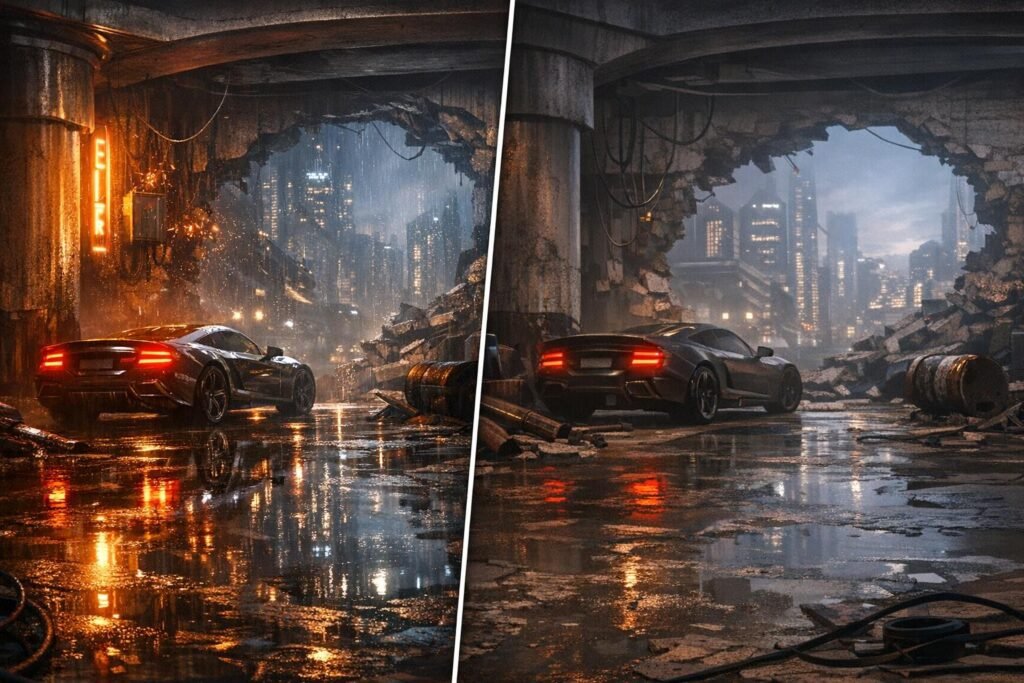
Ray traced reflections don’t have this limitation. That puddle on the street accurately reflects the building behind you. The polished marble floors in a corporate lobby show correct reflections of the entire environment. Glass surfaces display proper reflections with realistic distortion. These details add incredible immersion, making virtual environments feel substantially more believable.
Shadows with Natural Softness and Depth
Traditional shadow mapping creates sharp, often unrealistic shadows. Real-world shadows have soft edges (called penumbra) where the shadow gradually fades rather than cutting off sharply. The closer a shadow is to the object casting it, the sharper it appears; the farther away, the softer it becomes.
Ray traced shadows simulate this naturally. A character standing near a wall casts a sharp shadow on that wall, but as the shadow extends across the floor away from the character, it gradually softens. This single change adds tremendous depth perception and realism to game environments.
Global Illumination: Light That Bounces Naturally
This is perhaps the most technically impressive but hardest to immediately notice ray tracing effect. In reality, light doesn’t just come from direct sources like the sun or lamps—it bounces off every surface, creating subtle indirect lighting everywhere.
A red carpet near a white wall will cast a subtle reddish tint on that wall. Sunlight coming through a window doesn’t just illuminate the spot where it hits—it bounces around the entire room, creating soft ambient lighting. Ray traced global illumination simulates these complex light interactions, creating lighting that feels natural and cohesive rather than artificial and flat.
Games like Metro Exodus Enhanced Edition, Control, and Quake II RTX showcase ray tracing at its best, with comprehensive implementations that transform the entire lighting model. The difference between these games with ray tracing off versus on is night and day—literally in some cases.
The Performance Cost: The Uncomfortable Truth About Frame Rates
Now we need to discuss the elephant in the room: ray tracing is incredibly demanding on your hardware. Even with dedicated RT cores, enabling ray tracing effects will significantly reduce your frame rate.
Recent testing across 36 different games reveals the real-world performance impact. When enabling basic ray tracing at low settings, players experience an average performance decrease of approximately 22%. That might sound manageable—you’re losing roughly one-fifth of your frames—but it gets worse at higher quality settings.
Breaking Down the Numbers
At maximum ray tracing settings, the average performance hit reaches about 32%. This means if you’re running a game at 100 FPS without ray tracing, enabling it at max settings drops you to around 68 FPS. For games that already struggle to maintain 60 FPS, this can push you into uncomfortably choppy territory.
Some games are particularly brutal. Titles like Atomic Heart, Hitman 3, and Dying Light 2 can see performance drops exceeding 50% with full ray tracing enabled. These aren’t poorly optimized games necessarily—they’re just using comprehensive ray tracing implementations that calculate a lot of complex light interactions.
There are exceptions. Some games implement ray tracing conservatively, limiting the number of rays traced or the distance they travel. Resident Evil 4, Dead Space, and Deathloop show much smaller performance impacts, sometimes only 5-10%, because developers deliberately scaled back the ray tracing implementation to maintain playability.
Hardware Makes a Huge Difference
Your specific graphics card dramatically affects how painful the ray tracing performance hit feels. High-end cards like the RTX 4090 or RTX 4080 have so much raw power and so many RT cores that even with the performance decrease, they maintain playable frame rates.
Mid-range cards face a tougher challenge. An RTX 4060 or RX 7600 can handle ray tracing, but you’ll need to make compromises—lower ray tracing quality settings, reduced resolution, or using upscaling technologies (which we’ll discuss shortly).
Older ray tracing-capable cards like the RTX 2060 or 2070 really struggle with modern ray traced games. The first-generation RT cores are less efficient, and these cards lack the raw horsepower to maintain comfortable frame rates with ray tracing enabled in demanding titles.
DLSS and FSR: The Performance Lifeline
Fortunately, graphics card manufacturers recognized that ray tracing needed help to become practical for most gamers. The solution? AI-powered upscaling technologies that reconstruct high-resolution images from lower-resolution inputs.
NVIDIA’s DLSS Technology
Deep Learning Super Sampling (DLSS) uses artificial intelligence trained on thousands of high-quality game images to intelligently upscale lower-resolution frames. The game renders at a lower resolution (which is much faster), and DLSS uses AI to add detail and sharpness, creating an image that looks close to native resolution.
The latest DLSS 3 and DLSS 4 versions go even further, actually generating entirely new frames using AI. This frame generation technology can dramatically boost performance—in optimal scenarios, NVIDIA claims up to 8x performance multipliers, though real-world improvements typically range from 40-100%.
DLSS has become almost mandatory for enjoying ray tracing at high settings. The combination of ray tracing plus DLSS lets you have your cake and eat it too—beautiful ray traced graphics with acceptable frame rates. Many players report that DLSS on Quality mode looks virtually identical to native resolution while delivering 40-60% better performance.
AMD’s FSR and Intel’s XeSS
AMD offers FidelityFX Super Resolution (FSR), which works similarly to DLSS but uses different underlying technology. FSR 3 includes frame generation similar to DLSS 3, helping AMD card owners enjoy ray tracing with better performance.
Intel’s Arc graphics cards feature XeSS (Xe Super Sampling), another AI upscaling solution. While Intel’s discrete GPU market share remains small, XeSS provides decent results for Arc card owners wanting to experiment with ray tracing.
The key advantage of FSR is that it works on a wider range of hardware, including older GPUs without dedicated AI cores. However, DLSS typically produces slightly better image quality thanks to NVIDIA’s dedicated Tensor cores and extensive AI training.
Genre Matters: When Ray Tracing Actually Makes Sense
Not every game benefits equally from ray tracing. The genre and gameplay style make a huge difference in whether the visual improvements justify the performance cost.
Single-Player Story Games: Ray Tracing’s Sweet Spot
Narrative-driven single-player games benefit enormously from ray tracing. Titles like Cyberpunk 2077, Control, Metro Exodus Enhanced Edition, and Alan Wake 2 use ray tracing to create atmosphere and immersion.
When you’re exploring a beautifully crafted game world at your own pace, taking in the scenery and getting lost in the story, ray traced lighting genuinely enhances the experience. The realistic reflections in puddles during a rainy night scene, the way light streams through windows and bounces around rooms, the soft shadows that add depth to every environment—these details make fictional worlds feel more real and increase emotional engagement with the game.
For these games, even if ray tracing drops you from 90 FPS to 60 FPS, the trade-off is often worthwhile. You don’t need ultra-high frame rates for single-player adventures—60 FPS is perfectly smooth for exploring and experiencing the story.
Competitive Multiplayer: Frame Rate Reigns Supreme
Competitive shooters like Counter-Strike 2, Valorant, Apex Legends, and Overwatch 2 represent the opposite end of the spectrum. In these games, every frame matters for reaction time and competitive advantage.
Most serious competitive players actually reduce graphics settings to maximize frame rates, often targeting 144 FPS, 240 FPS, or even higher on high-refresh-rate monitors. Enabling ray tracing in these scenarios makes zero sense—you’re sacrificing tangible gameplay advantages for prettier reflections that you won’t even notice while focused on targets and objectives.
Even games like Call of Duty that include ray tracing options see most competitive players leave these features disabled. The visual improvements don’t justify the performance cost when winning matches depends on split-second reactions.
Racing Games and Simulators: Case-by-Case Basis
Racing games fall somewhere in between. Titles like Forza Motorsport implement ray tracing for enhanced car reflections and environmental detail. These effects can look spectacular, especially in replay modes and photo modes.
However, during actual racing, you’re focused on the track ahead, not studying reflections on your car’s hood. If enabling ray tracing drops your frame rate below 60 FPS, the racing experience suffers. Smooth, consistent frame pacing matters more for driving games than most other genres since any stuttering or frame drops can throw off your timing through corners.
Practical Implementation Guide: Getting Ray Tracing Right
If you’ve decided to experiment with ray tracing, here’s how to approach it intelligently to get the best balance of visual quality and performance.
Start Conservative with Settings
Don’t immediately max out all ray tracing options. Instead, start with low or medium ray tracing settings and observe the performance impact. If you’re losing less than 15-20% of your frame rate, you can gradually increase settings until you find the sweet spot.
Many games let you enable specific ray tracing effects individually. Try enabling just ray traced reflections first, then add shadows, then global illumination. This lets you identify which effects have the biggest visual impact versus performance cost for that particular game.
Always Use Upscaling Technologies
If you’re enabling ray tracing, you should almost always enable DLSS, FSR, or XeSS alongside it. The combination is what makes ray tracing practical on all but the most powerful graphics cards.
Start with Quality mode for upscaling, which provides minimal image quality loss while delivering significant performance gains. If you need more performance, try Balanced mode. Only drop to Performance or Ultra Performance modes if absolutely necessary, as these can introduce noticeable image softness or artifacts.
Monitor System Temperatures
Ray tracing pushes your graphics card hard, generating more heat than traditional rendering. Make sure your GPU temperatures stay within safe limits (typically below 80-85°C for most cards).
If temperatures spike too high, your card will thermal throttle, reducing its clock speeds and paradoxically making performance worse. Ensure your case has adequate airflow, clean dust from fans and heatsinks, and consider adjusting your graphics card’s fan curve if necessary.
Research Before Buying
Before purchasing a new game specifically for its ray tracing features, check YouTube for performance tests on your specific GPU. Not all ray tracing implementations are equal—some games run ray tracing efficiently, while others tank performance for minimal visual gain.
Look for comparison videos showing ray tracing on versus off. Sometimes the differences are dramatic and immediately obvious. Other times, you need to pause and carefully study screenshots to even notice the improvements. Understanding what you’re actually getting for the performance cost helps set realistic expectations.
The Hardware Consideration: Choosing Your Next GPU
If you’re shopping for a new graphics card, ray tracing capability is definitely a factor to consider, but it shouldn’t be the only factor—or necessarily even the primary one.
Budget Cards: Ray Tracing Capable But Limited
Budget options like the RTX 4060 or RX 7600 technically support ray tracing but struggle with demanding implementations. These cards work fine for light ray tracing in older or less demanding games, but expect to use low settings and upscaling for newer titles.
At this price point, you might be better off prioritizing raw rasterization performance for traditional gaming rather than focusing heavily on ray tracing capability. A card that runs non-ray-traced games at high settings and high frame rates provides better overall value than one that barely handles ray tracing.
Mid-Range Cards: The Ray Tracing Sweet Spot
Mid-range options like the RTX 4070, RTX 4070 Ti, or RX 7800 XT offer a good balance. These cards handle ray tracing competently, especially with upscaling enabled. You can enjoy ray traced games at 1440p with acceptable frame rates, making this tier ideal for gamers who want ray tracing without breaking the bank.
These cards represent the sweet spot where ray tracing becomes genuinely enjoyable rather than a slideshow with pretty lighting. You’ll still need to use medium-to-high ray tracing settings rather than maximum, but the visual improvements are substantial and performance remains playable.
High-End Cards: No-Compromise Ray Tracing
Flagship cards like the RTX 4090 or RTX 4080 Super handle ray tracing with ease, even at maximum settings and 4K resolution. If ray tracing is important to you and budget isn’t a concern, these cards deliver the experience without compromise.
These premium cards also handle path tracing—the most demanding ray tracing implementation—in games like Cyberpunk 2077 and Alan Wake 2. This represents the cutting edge of real-time graphics, offering visuals that were impossible just a few years ago.
The Future: Where Ray Tracing Is Headed
Ray tracing technology continues evolving rapidly. Each GPU generation delivers better ray tracing performance, and game developers are learning how to implement the technology more efficiently.
Console adoption through PlayStation 5 and Xbox Series X/S means more developers are building ray tracing into games from the ground up rather than adding it as an afterthought. This should lead to better-optimized implementations that deliver bigger visual improvements for smaller performance costs.
Upcoming technologies like NVIDIA’s Multi-Frame Generation and improved AI upscaling continue reducing the performance penalty. As these technologies mature, the trade-offs become less painful, making ray tracing accessible to more gamers without requiring thousand-dollar graphics cards.
Some developers are even building games entirely around ray tracing, using it as the primary rendering method rather than a supplement to traditional techniques. These “ray tracing native” games can potentially run better than hybrid approaches while looking even more realistic.
The Final Verdict: Should You Care About Ray Tracing?
After examining ray tracing from every angle, here’s the honest conclusion: ray tracing is a genuine technological advancement that meaningfully improves graphics quality, but it comes with real costs that won’t make sense for every gamer.
You should prioritize ray tracing if:
- You primarily play single-player story-driven games where atmosphere and visual fidelity enhance your enjoyment
- You own or plan to buy a mid-to-high-end graphics card capable of handling the performance overhead
- You game at 1440p or 4K resolution where ray tracing’s visual improvements are most noticeable
- You’re willing to use upscaling technologies like DLSS or FSR to maintain playable frame rates
- You appreciate graphical detail and enjoy maximizing visual quality in your games
Ray tracing probably isn’t worth it for you if:
- You primarily play competitive multiplayer games where maximum frame rates matter more than graphics quality
- You’re gaming on a budget card that struggles to maintain 60 FPS with ray tracing enabled
- You game at 1080p on a standard 60Hz monitor where the visual improvements are less noticeable
- You’d rather invest in a better monitor, more storage, or other PC components than ray tracing capability
- You’re perfectly satisfied with how current games look without ray tracing
Ray tracing represents the future of game graphics, but it’s not a revolutionary change that makes older games unplayable by comparison. Think of it as the evolution from 30 FPS to 60 FPS, or from 1080p to 1440p—a meaningful improvement that enhances the experience but doesn’t fundamentally change whether a game is fun to play.
The best approach? Don’t buy hardware exclusively for ray tracing, but if you’re upgrading anyway, choose a card with solid ray tracing performance within your budget. That way, you can enjoy the technology when it makes sense without feeling like you overpaid for a feature you rarely use.
Ultimately, ray tracing is a tool—an impressive one, but still just a tool. Great games remain great without it, and bad games aren’t saved by pretty lighting. Use ray tracing where it enhances your experience, skip it where it doesn’t, and don’t stress too much about whether you’re getting the “correct” ray tracing experience. Gaming is supposed to be fun, not a constant technical optimization challenge.
Frequently Asked Questions About Ray Tracing
What is the minimum GPU needed for ray tracing?
The minimum GPU for hardware-accelerated ray tracing is NVIDIA RTX 2060 or AMD RX 6600. However, these entry-level ray tracing cards struggle with demanding implementations and typically require low settings with upscaling enabled. For a comfortable ray tracing experience, consider at least an RTX 4060 Ti or RX 7700 XT.
Does ray tracing work with older games?
Ray tracing only works in games specifically programmed to support it. Developers must add ray tracing features through updates or patches. Some classic games like Quake II, Minecraft, and Portal have received ray tracing updates, but most older titles will never support the technology without complete remasters.
Can I enable ray tracing on AMD graphics cards?
Yes, AMD Radeon RX 6000 and 7000 series cards support ray tracing through their built-in ray accelerators. However, AMD cards generally perform slightly worse than comparable NVIDIA cards in ray traced workloads. AMD cards work best with FSR upscaling to compensate for the performance impact.
How much does ray tracing reduce FPS?
The FPS reduction varies by game and settings but typically ranges from 20% at low ray tracing settings to 45% at maximum settings. Some poorly optimized games can see drops exceeding 50%. Using DLSS or FSR can recover most of this lost performance while maintaining ray traced visual effects.
Is ray tracing worth it at 1080p resolution?
Ray tracing’s visual improvements are less noticeable at 1080p compared to higher resolutions. The performance cost remains the same, so you’re sacrificing more relative performance for less visible benefit. If gaming at 1080p, prioritize higher frame rates over ray tracing unless you’re playing visually stunning single-player games where you can appreciate the details.
What’s the difference between ray tracing and path tracing?
Ray tracing typically refers to hybrid implementations that use ray tracing for specific effects like reflections or shadows while using traditional rendering for everything else. Path tracing is a more comprehensive technique that uses ray tracing for all lighting calculations, resulting in more realistic visuals but significantly higher performance demands. Path tracing represents the most demanding form of real-time ray tracing.
Comments (0)
Sign In / Sign Up
Sign in with your Google account to leave a comment. It's fast, easy, and secure.
No comments yet
Be the first one to share your thoughts!